> ## Documentation Index
> Fetch the complete documentation index at: https://bun.ll1025.cn/llms.txt
> Use this file to discover all available pages before exploring further.
# Bun Redis 与 Upstash
[Upstash](https://upstash.com/) 是一个完全托管的 Redis 数据库即服务。它使用 Redis® API,因此你可以使用 Bun 的原生 Redis 客户端进行连接。
默认情况下,所有 Upstash Redis 数据库都启用了 TLS。
***
使用 `bun init` 创建一个新项目:
```sh terminal icon="terminal" theme={null}
bun init bun-upstash-redis
cd bun-upstash-redis
```
前往 [Upstash 仪表盘](https://console.upstash.com/) 并创建一个新的 Redis 数据库。完成[入门指南](https://upstash.com/docs/redis/overall/getstarted)后,你将看到包含连接信息的数据库页面。
数据库页面显示两种连接方式:HTTP 和 TLS。对于 Bun 的 Redis 客户端,你需要 **TLS** 连接详情;URL 以 `rediss://` 开头。
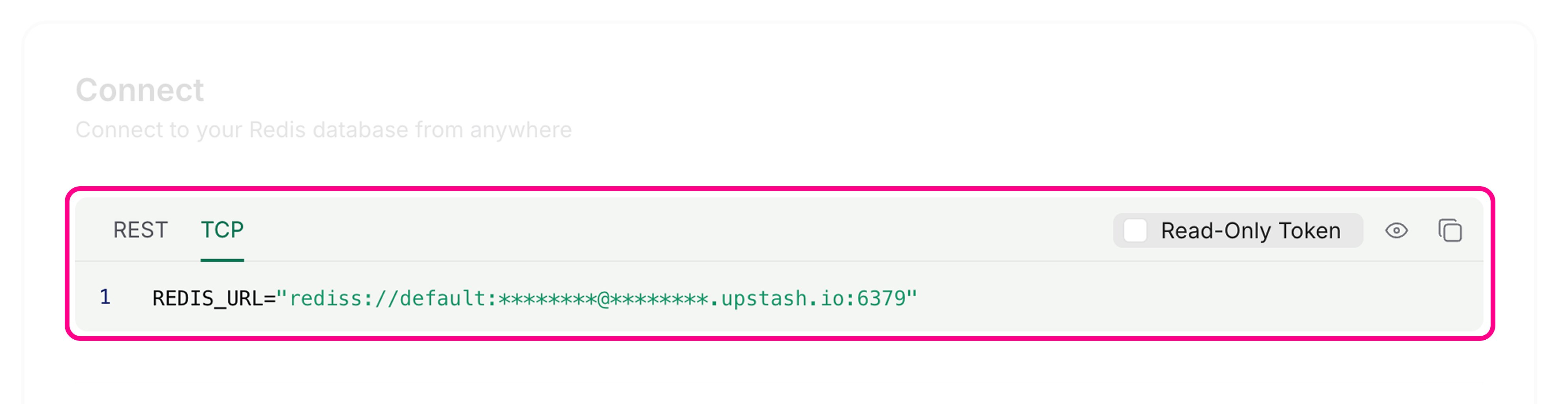 使用 Redis 端点(而非 REST URL)在 `.env` 文件中设置 `REDIS_URL` 环境变量:
```ini .env icon="settings" theme={null}
REDIS_URL=rediss://********@********.upstash.io:6379
```
Bun 的 Redis 客户端默认从 `REDIS_URL` 读取连接信息:
```ts index.ts icon="https://mintcdn.com/span-inc/82N53aP7NFbaCVSl/icons/typescript.svg?fit=max&auto=format&n=82N53aP7NFbaCVSl&q=85&s=787d39d6a7d96d7f9540dc74344eba23" theme={null}
import { redis } from "bun";
// 自动读取 process.env.REDIS_URL
await redis.set("counter", "0"); // [!code ++]
```
或者,使用 `RedisClient` 创建自定义客户端:
```ts index.ts icon="https://mintcdn.com/span-inc/82N53aP7NFbaCVSl/icons/typescript.svg?fit=max&auto=format&n=82N53aP7NFbaCVSl&q=85&s=787d39d6a7d96d7f9540dc74344eba23" theme={null}
import { RedisClient } from "bun";
const redis = new RedisClient(process.env.REDIS_URL); // [!code ++]
```
使用 Redis 客户端在你的 Upstash 数据库中读取和写入键值:
```ts index.ts icon="https://mintcdn.com/span-inc/82N53aP7NFbaCVSl/icons/typescript.svg?fit=max&auto=format&n=82N53aP7NFbaCVSl&q=85&s=787d39d6a7d96d7f9540dc74344eba23" theme={null}
import { redis } from "bun";
// 获取一个值
let counter = await redis.get("counter");
// 如果值不存在则设置
if (!counter) {
await redis.set("counter", "0");
}
// 递增计数器
await redis.incr("counter");
// 获取更新后的值
counter = await redis.get("counter");
console.log(counter);
```
```txt theme={null}
1
```
Redis 客户端会自动处理连接。对于基本操作,你无需手动连接或断开连接。
使用 Redis 端点(而非 REST URL)在 `.env` 文件中设置 `REDIS_URL` 环境变量:
```ini .env icon="settings" theme={null}
REDIS_URL=rediss://********@********.upstash.io:6379
```
Bun 的 Redis 客户端默认从 `REDIS_URL` 读取连接信息:
```ts index.ts icon="https://mintcdn.com/span-inc/82N53aP7NFbaCVSl/icons/typescript.svg?fit=max&auto=format&n=82N53aP7NFbaCVSl&q=85&s=787d39d6a7d96d7f9540dc74344eba23" theme={null}
import { redis } from "bun";
// 自动读取 process.env.REDIS_URL
await redis.set("counter", "0"); // [!code ++]
```
或者,使用 `RedisClient` 创建自定义客户端:
```ts index.ts icon="https://mintcdn.com/span-inc/82N53aP7NFbaCVSl/icons/typescript.svg?fit=max&auto=format&n=82N53aP7NFbaCVSl&q=85&s=787d39d6a7d96d7f9540dc74344eba23" theme={null}
import { RedisClient } from "bun";
const redis = new RedisClient(process.env.REDIS_URL); // [!code ++]
```
使用 Redis 客户端在你的 Upstash 数据库中读取和写入键值:
```ts index.ts icon="https://mintcdn.com/span-inc/82N53aP7NFbaCVSl/icons/typescript.svg?fit=max&auto=format&n=82N53aP7NFbaCVSl&q=85&s=787d39d6a7d96d7f9540dc74344eba23" theme={null}
import { redis } from "bun";
// 获取一个值
let counter = await redis.get("counter");
// 如果值不存在则设置
if (!counter) {
await redis.set("counter", "0");
}
// 递增计数器
await redis.incr("counter");
// 获取更新后的值
counter = await redis.get("counter");
console.log(counter);
```
```txt theme={null}
1
```
Redis 客户端会自动处理连接。对于基本操作,你无需手动连接或断开连接。