> ## Documentation Index
> Fetch the complete documentation index at: https://bun.ll1025.cn/llms.txt
> Use this file to discover all available pages before exploring further.
# 调试
> 使用 WebKit Inspector 协议通过交互式调试器调试 Bun 代码
Bun 支持 [WebKit Inspector 协议](https://github.com/oven-sh/bun/blob/main/packages/bun-inspector-protocol/src/protocol/jsc/index.d.ts),因此你可以使用交互式调试器调试代码。为演示目的,考虑以下 Web 服务器。
## 调试 JavaScript 和 TypeScript
```typescript icon="https://mintcdn.com/span-inc/82N53aP7NFbaCVSl/icons/typescript.svg?fit=max&auto=format&n=82N53aP7NFbaCVSl&q=85&s=787d39d6a7d96d7f9540dc74344eba23" title="server.ts" theme={null}
Bun.serve({
fetch(req) {
console.log(req.url);
return new Response("Hello, world!");
},
});
```
### `--inspect`
要在运行 Bun 代码时启用调试,请使用 `--inspect` 标志。这会在可用端口上启动一个 WebSocket 服务器,用于检查正在运行的 Bun 进程。
```sh icon="terminal" title="terminal" theme={null}
bun --inspect server.ts
```
```txt id="terminal" theme={null}
--------------------- Bun Inspector ---------------------
Listening:
ws://localhost:6499/0tqxs9exrgrm
Inspect in browser:
https://debug.bun.sh/#localhost:6499/0tqxs9exrgrm
--------------------- Bun Inspector ---------------------
```
### `--inspect-brk`
`--inspect-brk` 标志与 `--inspect` 行为完全相同,只是它会在执行的脚本的第一行注入一个断点。用于调试那些运行速度快且立即退出的脚本。
### `--inspect-wait`
`--inspect-wait` 标志与 `--inspect` 行为完全相同,只是代码在调试器附加到运行进程之前不会执行。
### 为调试器设置端口或 URL
无论使用哪个标志,你都可以指定端口号、URL 前缀或两者。
```sh icon="terminal" title="terminal" theme={null}
bun --inspect=4000 server.ts
bun --inspect=localhost:4000 server.ts
bun --inspect=localhost:4000/prefix server.ts
```
***
## 调试器
多种调试工具可以连接到该服务器。
### `debug.bun.sh`
Bun 在 [debug.bun.sh](https://debug.bun.sh) 上托管了一个基于 Web 的调试器。它是 WebKit 的 [Web Inspector Interface](https://webkit.org/web-inspector/web-inspector-interface/) 的修改版本,对 Safari 用户来说很熟悉。
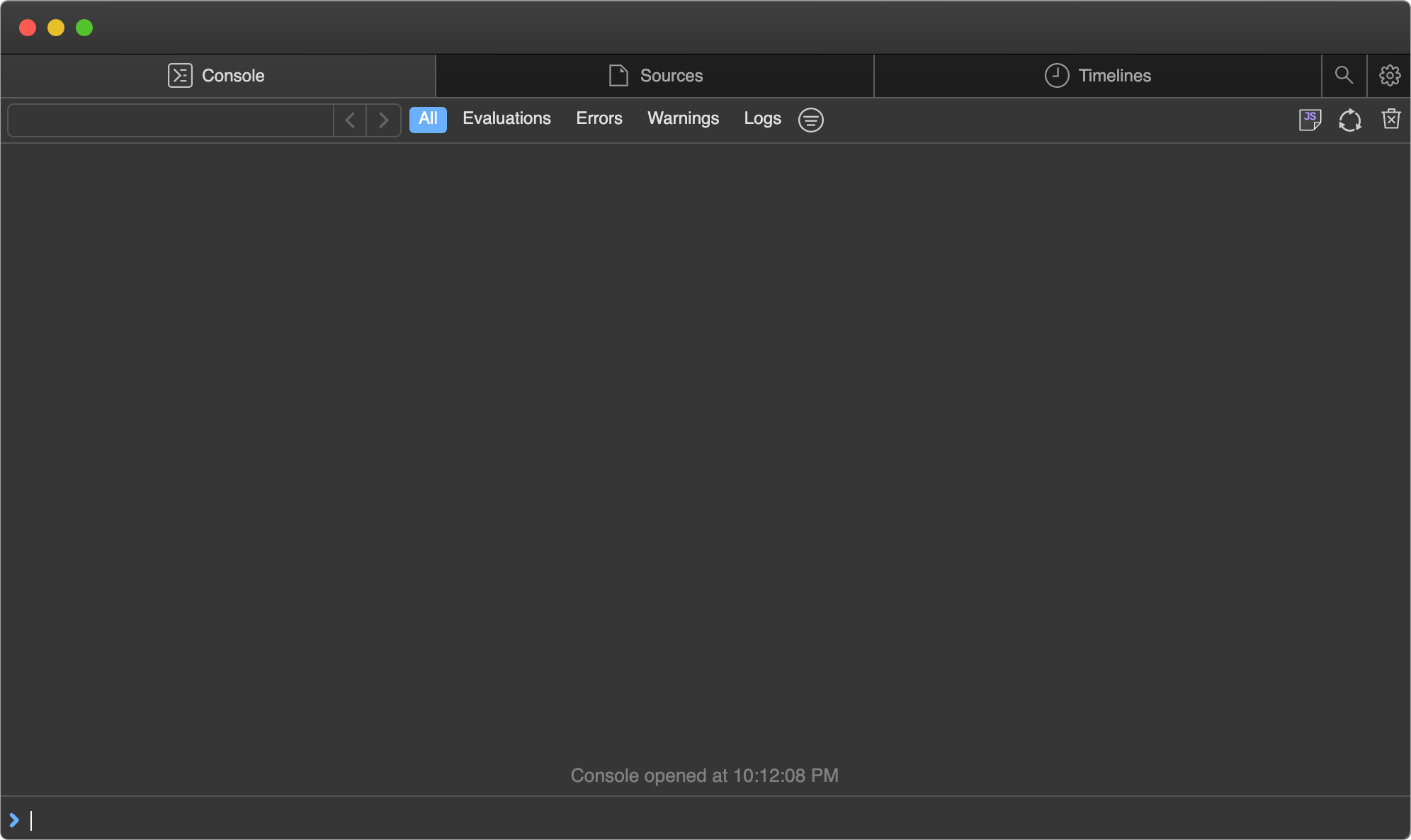
在浏览器中打开提供的 `debug.bun.sh` URL 以启动调试会话。在这个界面中,你可以查看运行文件的源代码、查看和设置断点,以及使用内置控制台执行代码。
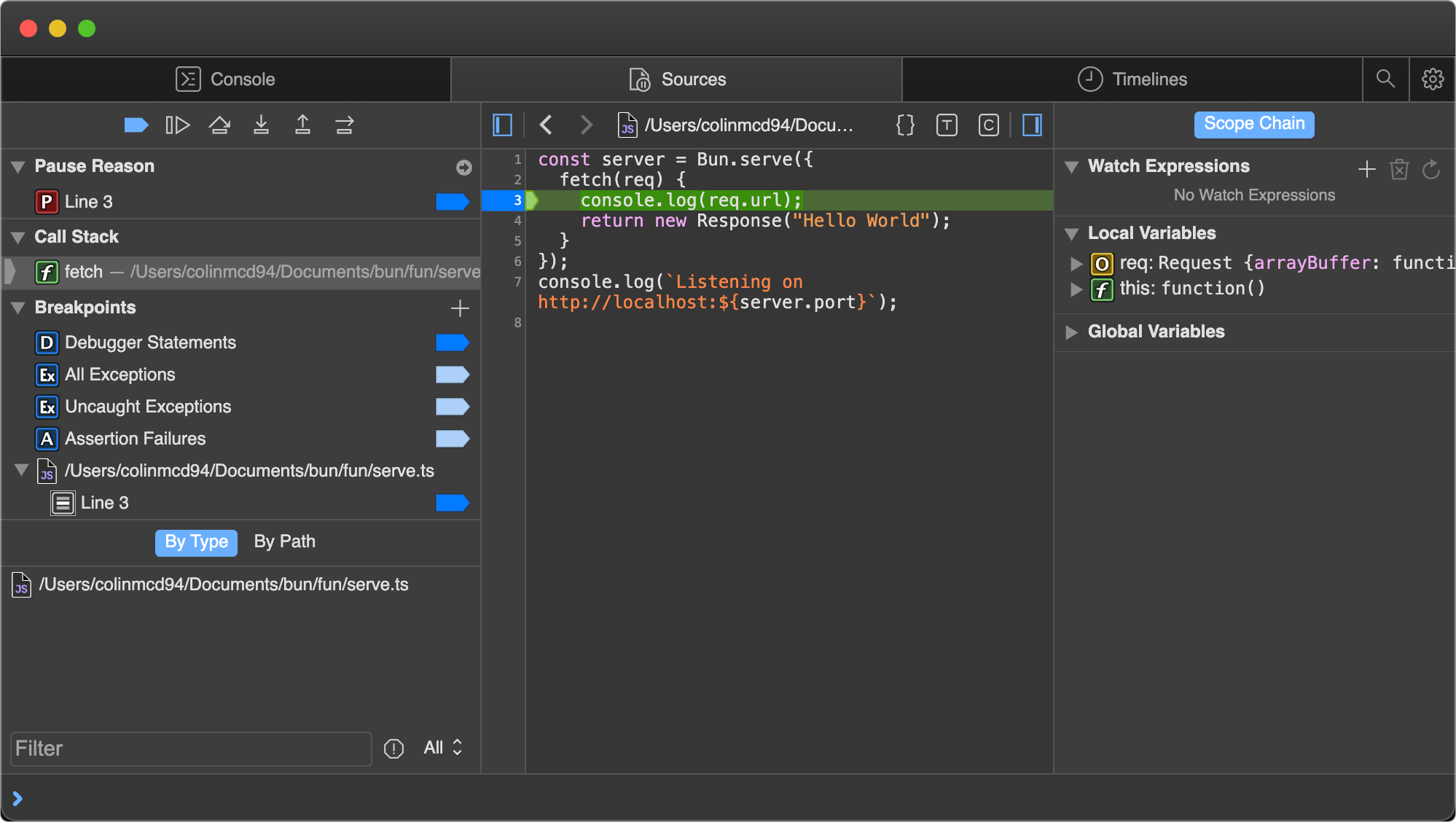
打开 Sources 标签页;你应该能看到之前的代码。点击行号 `3`,在 `console.log(req.url)` 语句上设置断点。

然后在浏览器中访问 [`http://localhost:3000`](http://localhost:3000)。页面永远不会完成加载,因为程序已在断点处暂停。
注意 UI 的变化。
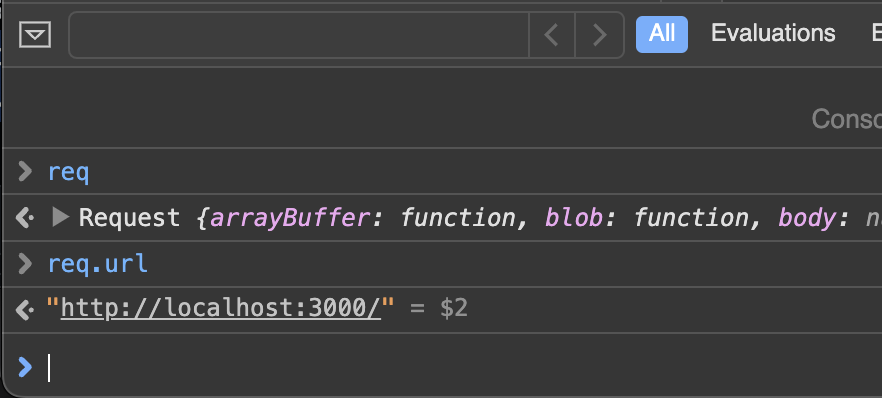
暂停时,使用底部的控制台在程序的上下文中运行任意代码,可以完全访问断点范围内的变量。
Sources 窗格的右侧列出了当前范围内的所有局部变量。展开其中一个(如这里的 `req`)以查看其属性和方法。

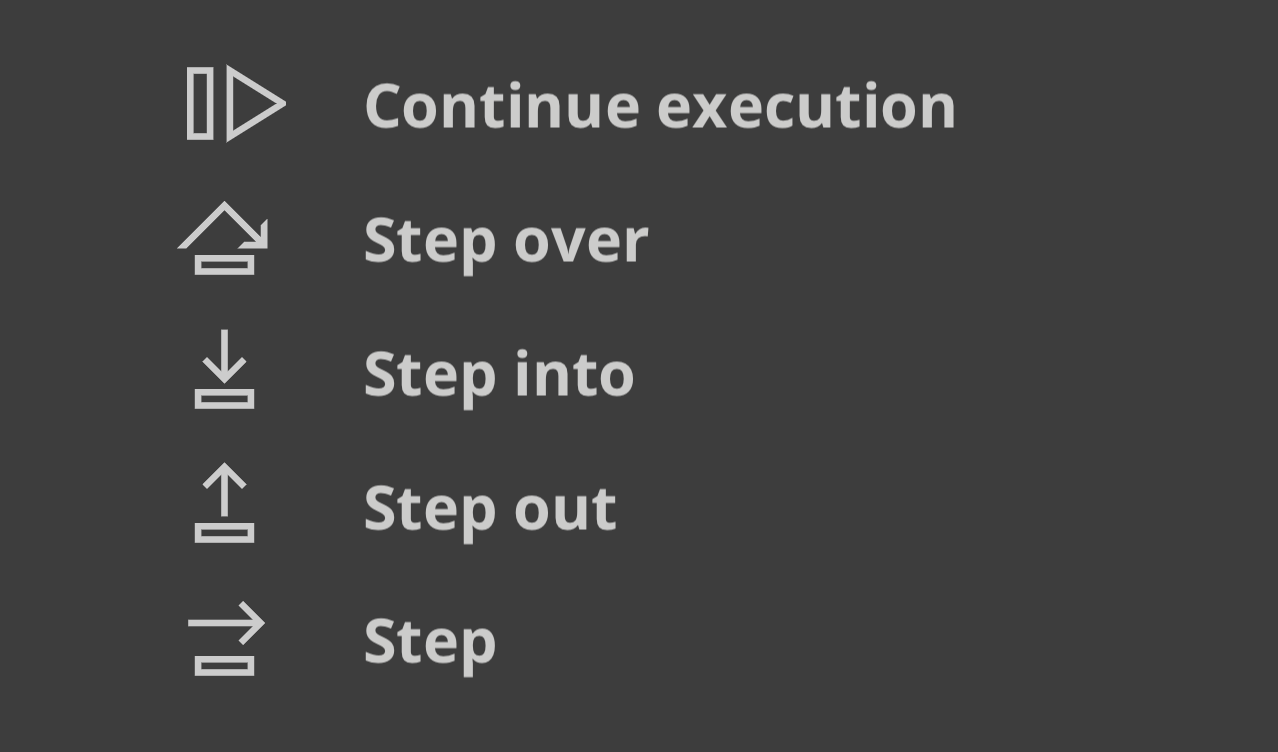
Sources 窗格左上角的控件驱动程序的执行。

各按钮的作用:
* *继续脚本执行* — 运行到下一个断点或异常。
* *单步跳过* — 前进到下一行。
* *单步进入* — 如果当前语句包含函数调用,则进入被调用的函数。
* *单步退出* — 如果当前语句是一个函数调用,完成其执行,然后返回到调用它的位置。
### Visual Studio Code 调试器
Visual Studio Code 对调试 Bun 脚本的支持是实验性的。要使用它,请安装 [Bun VSCode 扩展](/guides/runtime/vscode-debugger)。
***
## 调试网络请求
设置 `BUN_CONFIG_VERBOSE_FETCH` 环境变量以记录使用 `fetch()` 或 `node:http` 发起的网络请求。
| 值 | 描述 |
| ------- | ---------------- |
| `curl` | 将请求打印为 `curl` 命令 |
| `true` | 打印请求和响应信息 |
| `false` | 不打印任何内容(默认) |
### 将 fetch 和 node:http 请求打印为 curl 命令
将 `BUN_CONFIG_VERBOSE_FETCH` 设置为 `curl`,以将每个 `fetch()` 和 `node:http` 请求打印为单行 `curl` 命令,你可以复制粘贴到终端中重放该请求。
```ts index.ts icon="https://mintcdn.com/span-inc/82N53aP7NFbaCVSl/icons/typescript.svg?fit=max&auto=format&n=82N53aP7NFbaCVSl&q=85&s=787d39d6a7d96d7f9540dc74344eba23" theme={null}
process.env.BUN_CONFIG_VERBOSE_FETCH = "curl";
await fetch("https://example.com", {
method: "POST",
headers: {
"Content-Type": "application/json",
},
body: JSON.stringify({ foo: "bar" }),
});
```
```txt theme={null}
[fetch] $ curl --http1.1 "https://example.com/" -X POST -H "content-type: application/json" -H "Connection: keep-alive" -H "User-Agent: Bun/1.3.3" -H "Accept: */*" -H "Host: example.com" -H "Accept-Encoding: gzip, deflate, br" --compressed -H "Content-Length: 13" --data-raw "{\"foo\":\"bar\"}"
[fetch] > HTTP/1.1 POST https://example.com/
[fetch] > content-type: application/json
[fetch] > Connection: keep-alive
[fetch] > User-Agent: Bun/1.3.3
[fetch] > Accept: */*
[fetch] > Host: example.com
[fetch] > Accept-Encoding: gzip, deflate, br
[fetch] > Content-Length: 13
[fetch] < 200 OK
[fetch] < Accept-Ranges: bytes
[fetch] < Cache-Control: max-age=604800
[fetch] < Content-Type: text/html; charset=UTF-8
[fetch] < Date: Tue, 18 Jun 2024 05:12:07 GMT
[fetch] < Etag: "3147526947"
[fetch] < Expires: Tue, 25 Jun 2024 05:12:07 GMT
[fetch] < Last-Modified: Thu, 17 Oct 2019 07:18:26 GMT
[fetch] < Server: EOS (vny/044F)
[fetch] < Content-Length: 1256
```
以 `[fetch] >` 开头的行是本地代码发出的请求,以 `[fetch] <` 开头的行是远程服务器的响应。
要打印时不带 `curl` 命令,请将 `BUN_CONFIG_VERBOSE_FETCH` 设置为 `true`。
```ts index.ts icon="https://mintcdn.com/span-inc/82N53aP7NFbaCVSl/icons/typescript.svg?fit=max&auto=format&n=82N53aP7NFbaCVSl&q=85&s=787d39d6a7d96d7f9540dc74344eba23" theme={null}
process.env.BUN_CONFIG_VERBOSE_FETCH = "true";
await fetch("https://example.com", {
method: "POST",
headers: {
"Content-Type": "application/json",
},
body: JSON.stringify({ foo: "bar" }),
});
```
```txt theme={null}
[fetch] > HTTP/1.1 POST https://example.com/
[fetch] > content-type: application/json
[fetch] > Connection: keep-alive
[fetch] > User-Agent: Bun/1.3.3
[fetch] > Accept: */*
[fetch] > Host: example.com
[fetch] > Accept-Encoding: gzip, deflate, br
[fetch] > Content-Length: 13
[fetch] < 200 OK
[fetch] < Accept-Ranges: bytes
[fetch] < Cache-Control: max-age=604800
[fetch] < Content-Type: text/html; charset=UTF-8
[fetch] < Date: Tue, 18 Jun 2024 05:12:07 GMT
[fetch] < Etag: "3147526947"
[fetch] < Expires: Tue, 25 Jun 2024 05:12:07 GMT
[fetch] < Last-Modified: Thu, 17 Oct 2019 07:18:26 GMT
[fetch] < Server: EOS (vny/044F)
[fetch] < Content-Length: 1256
```
***
## 堆栈跟踪与 source maps
Bun 会转译每个文件,这可能导致堆栈跟踪指向转译后的输出。为避免这种情况,Bun 为其转译的每个文件生成并提供 sourcemapped 文件。当你在控制台中看到堆栈跟踪时,可以点击文件路径跳转到原始源代码,即使该文件是用 TypeScript 或 JSX 编写的,或者经过了其他转换。
Bun 在两种情况下都会加载 sourcemaps:一是在运行时按需转译文件时,二是在使用 `bun build` 提前预编译文件时。
### 语法高亮的源代码预览
当发生未处理的异常或拒绝时,Bun 会打印一个简短的源代码预览。要自行生成相同的输出,请调用 `Bun.inspect(error)`:
```ts theme={null}
// 创建一个错误
const err = new Error("Something went wrong");
console.log(Bun.inspect(err, { colors: true }));
```
输出是错误发生处源代码的语法高亮预览,同时包含错误消息和堆栈跟踪。
```ts icon="file-code" theme={null}
1 | // 创建一个错误
2 | const err = new Error("Something went wrong");
^
error: Something went wrong
at file.js:2:13
```
### V8 堆栈跟踪
Bun 使用 JavaScriptCore 作为其引擎,但 Node.js 生态系统和 npm 中的很多包期望 V8 的行为,而不同的 JavaScript 引擎在格式化 `error.stack` 方面存在差异。由于 Bun 旨在成为 Node.js 的直接替代品,它使用与 V8 相同的方式格式化 `error.stack`。这对那些期望 V8 堆栈跟踪的库尤为重要。
#### V8 Stack Trace API
Bun 实现了 [V8 Stack Trace API](https://v8.dev/docs/stack-trace-api),这是一组用于操作堆栈跟踪的函数。
##### `Error.prepareStackTrace`
定义一个全局的 `Error.prepareStackTrace` 函数来自定义堆栈跟踪输出。它接收错误对象和 `CallSite` 对象数组,其返回值将成为 `error.stack`。
```ts theme={null}
Error.prepareStackTrace = (err, stack) => {
return stack.map(callSite => {
return callSite.getFileName();
});
};
const err = new Error("Something went wrong");
console.log(err.stack);
// [ "error.js" ]
```
`CallSite` 对象具有以下方法:
| 方法 | 返回 |
| -------------------------- | ------------------------- |
| `getThis` | 函数调用的 `this` 值 |
| `getTypeName` | typeof `this` |
| `getFunction` | 函数对象 |
| `getFunctionName` | 函数名称(字符串) |
| `getMethodName` | 方法名称(字符串) |
| `getFileName` | 文件名或 URL |
| `getLineNumber` | 行号 |
| `getColumnNumber` | 列号 |
| `getEvalOrigin` | `undefined` |
| `getScriptNameOrSourceURL` | 源 URL |
| `isToplevel` | 如果函数在全局作用域中,返回 `true` |
| `isEval` | 如果函数是 `eval` 调用,返回 `true` |
| `isNative` | 如果函数是原生的,返回 `true` |
| `isConstructor` | 如果函数是构造函数,返回 `true` |
| `isAsync` | 如果函数是 `async`,返回 `true` |
| `isPromiseAll` | 尚未实现。 |
| `getPromiseIndex` | 尚未实现。 |
| `toString` | 返回调用点的字符串表示形式 |
如果 `Function` 对象已被垃圾回收,其中一些方法可能会返回 `undefined`。
##### `Error.captureStackTrace(error, startFn)`
`Error.captureStackTrace` 在代码中的特定点捕获堆栈跟踪,而不是在错误被抛出的点。
这在回调或异步代码使得难以确定错误来源时很有帮助。`Error.captureStackTrace` 的第二个参数是你希望堆栈跟踪开始的函数。
在以下示例中,`err.stack` 指向调用 `fn()` 的代码,即使错误是在 `myInner` 中抛出的。
```ts index.ts icon="https://mintcdn.com/span-inc/82N53aP7NFbaCVSl/icons/typescript.svg?fit=max&auto=format&n=82N53aP7NFbaCVSl&q=85&s=787d39d6a7d96d7f9540dc74344eba23" theme={null}
const fn = () => {
function myInner() {
throw err;
}
try {
myInner();
} catch (err) {
console.log(err.stack);
console.log("");
console.log("-- captureStackTrace --");
console.log("");
Error.captureStackTrace(err, fn);
console.log(err.stack);
}
};
fn();
```
```txt theme={null}
Error: here!
at myInner (file.js:4:15)
at fn (file.js:8:5)
at module code (file.js:17:1)
at moduleEvaluation (native)
at moduleEvaluation (native)
at (native)
-- captureStackTrace --
Error: here!
at module code (file.js:17:1)
at moduleEvaluation (native)
at moduleEvaluation (native)
at (native)
```