> ## Documentation Index
> Fetch the complete documentation index at: https://bun.ll1025.cn/llms.txt
> Use this file to discover all available pages before exploring further.
# 文件 I/O
> Bun 提供了一组优化的 API 用于读取和写入文件
本页记录的 `Bun.file` 和 `Bun.write` API 经过高度优化,是 Bun 中处理文件的推荐方式。对于它们未覆盖的操作,如 `mkdir` 或 `readdir`,请使用 Bun [几乎完整](/runtime/nodejs-compat#node-fs) 实现的 [`node:fs`](https://nodejs.org/api/fs.html) 模块。
***
## 读取文件 (`Bun.file()`)
`Bun.file(path): BunFile`
使用 `Bun.file(path)` 函数创建一个 `BunFile` 实例。`BunFile` 表示一个惰性加载的文件;初始化它不会从磁盘读取文件。
```ts theme={null}
const foo = Bun.file("foo.txt"); // 相对于当前工作目录
foo.size; // 字节数
foo.type; // MIME 类型
```
该引用符合 [`Blob`](https://developer.mozilla.org/en-US/docs/Web/API/Blob) 接口,因此内容可以以多种格式读取。
```ts theme={null}
const foo = Bun.file("foo.txt");
await foo.text(); // 字符串格式的内容
await foo.json(); // JSON 对象格式的内容
foo.stream(); // ReadableStream 格式的内容
await foo.arrayBuffer(); // ArrayBuffer 格式的内容
await foo.bytes(); // Uint8Array 格式的内容
```
你也可以从数值型[文件描述符](https://en.wikipedia.org/wiki/File_descriptor)或 `file://` URL 创建文件引用。
```ts theme={null}
Bun.file(1234);
Bun.file(new URL(import.meta.url)); // 引用当前文件
```
`BunFile` 可以指向磁盘上不存在的文件位置。
```ts theme={null}
const notreal = Bun.file("notreal.txt");
notreal.size; // 0
notreal.type; // "text/plain;charset=utf-8"
const exists = await notreal.exists(); // false
```
默认 MIME 类型是 `text/plain;charset=utf-8`。通过向 `Bun.file` 传递第二个参数来覆盖它。
```ts theme={null}
const notreal = Bun.file("notreal.json", { type: "application/json" });
notreal.type; // => "application/json;charset=utf-8"
```
为方便起见,Bun 将 `stdin`、`stdout` 和 `stderr` 作为 `BunFile` 实例暴露。
```ts theme={null}
Bun.stdin; // 只读
Bun.stdout;
Bun.stderr;
```
### 删除文件 (`file.delete()`)
调用 `.delete()` 删除文件。
```ts theme={null}
await Bun.file("logs.json").delete();
```
***
## 写入文件 (`Bun.write()`)
`Bun.write(destination, data): Promise`
`Bun.write` 函数是一个多功能工具,用于将各种类型的数据写入磁盘。
第一个参数是 `destination`,可以是以下任何一种:
* `string`:文件系统上的路径。使用 `"path"` 模块操作路径。
* `URL`:一个 `file://` 描述符。
* `BunFile`:文件引用。
第二个参数是要写入的数据。可以是以下任何一种:
* `string`
* `Blob`(包括 `BunFile`)
* `ArrayBuffer` 或 `SharedArrayBuffer`
* `TypedArray`(`Uint8Array` 等)
* `Response`
Bun 会为当前平台上每种组合使用最快的可用系统调用。
| 输出 | 输入 | 系统调用 | 平台 |
| ------- | --------- | --------------------------- | ----- |
| 文件 | 文件 | copy\_file\_range | Linux |
| 文件 | 管道 | sendfile | Linux |
| 管道 | 管道 | splice | Linux |
| 终端 | 文件 | sendfile | Linux |
| 终端 | 终端 | sendfile | Linux |
| 套接字 | 文件或管道 | sendfile (如果 http, 非 https) | Linux |
| 文件(不存在) | 文件(路径) | clonefile | macOS |
| 文件(存在) | 文件 | fcopyfile | macOS |
| 文件 | Blob 或字符串 | write | macOS |
| 文件 | Blob 或字符串 | write | Linux |
将字符串写入磁盘:
```ts theme={null}
const data = `这是最好的时代,也是最坏的时代。`;
await Bun.write("output.txt", data);
```
将文件复制到磁盘上的另一个位置:
```ts theme={null}
const input = Bun.file("input.txt");
const output = Bun.file("output.txt"); // 尚不存在!
await Bun.write(output, input);
```
将字节数组写入磁盘:
```ts theme={null}
const encoder = new TextEncoder();
const data = encoder.encode("datadatadata"); // Uint8Array
await Bun.write("output.txt", data);
```
将文件写入 `stdout`:
```ts theme={null}
const input = Bun.file("input.txt");
await Bun.write(Bun.stdout, input);
```
将 HTTP 响应的主体写入磁盘:
```ts theme={null}
const response = await fetch("https://bun.com");
await Bun.write("index.html", response);
```
***
## 增量写入与 `FileSink`
Bun 提供了一个名为 `FileSink` 的原生增量文件写入 API。要从 `BunFile` 获取 `FileSink` 实例:
```ts theme={null}
const file = Bun.file("output.txt");
const writer = file.writer();
```
要增量写入文件,调用 `.write()`。
```ts theme={null}
const file = Bun.file("output.txt");
const writer = file.writer();
writer.write("it was the best of times\n");
writer.write("it was the worst of times\n");
```
这些数据块在内部缓冲。要刷新缓冲区到磁盘,使用 `.flush()`。它会返回已刷新的字节数。
```ts theme={null}
writer.flush(); // 将缓冲区写入磁盘
```
当 `FileSink` 的\_高水位线\_被达到时,即其内部缓冲区已满,缓冲区也会自动刷新。你可以配置此值。
```ts theme={null}
const file = Bun.file("output.txt");
const writer = file.writer({ highWaterMark: 1024 * 1024 }); // 1MB
```
要刷新缓冲区并关闭文件:
```ts theme={null}
writer.end();
```
默认情况下,`bun` 进程会保持活动状态,直到此 `FileSink` 通过 `.end()` 显式关闭。要退出此行为,对实例执行 "unref"。
```ts theme={null}
writer.unref();
// 稍后 "重新 ref"
writer.ref();
```
***
## 目录
Bun 的 `node:fs` 实现速度很快。在 Bun 中操作目录请使用 `node:fs`。
### 读取目录 (readdir)
要在 Bun 中读取目录,使用 `node:fs` 的 `readdir`。
```ts theme={null}
import { readdir } from "node:fs/promises";
// 读取当前目录中的所有文件
const files = await readdir(import.meta.dir);
```
#### 递归读取目录
要在 Bun 中递归读取目录,使用带 `recursive: true` 的 `readdir`。
```ts theme={null}
import { readdir } from "node:fs/promises";
// 递归读取当前目录中的所有文件
const files = await readdir("../", { recursive: true });
```
### 创建目录 (mkdir)
要递归创建目录,使用 `node:fs` 中的 `mkdir`:
```ts theme={null}
import { mkdir } from "node:fs/promises";
await mkdir("path/to/dir", { recursive: true });
```
***
## 基准测试
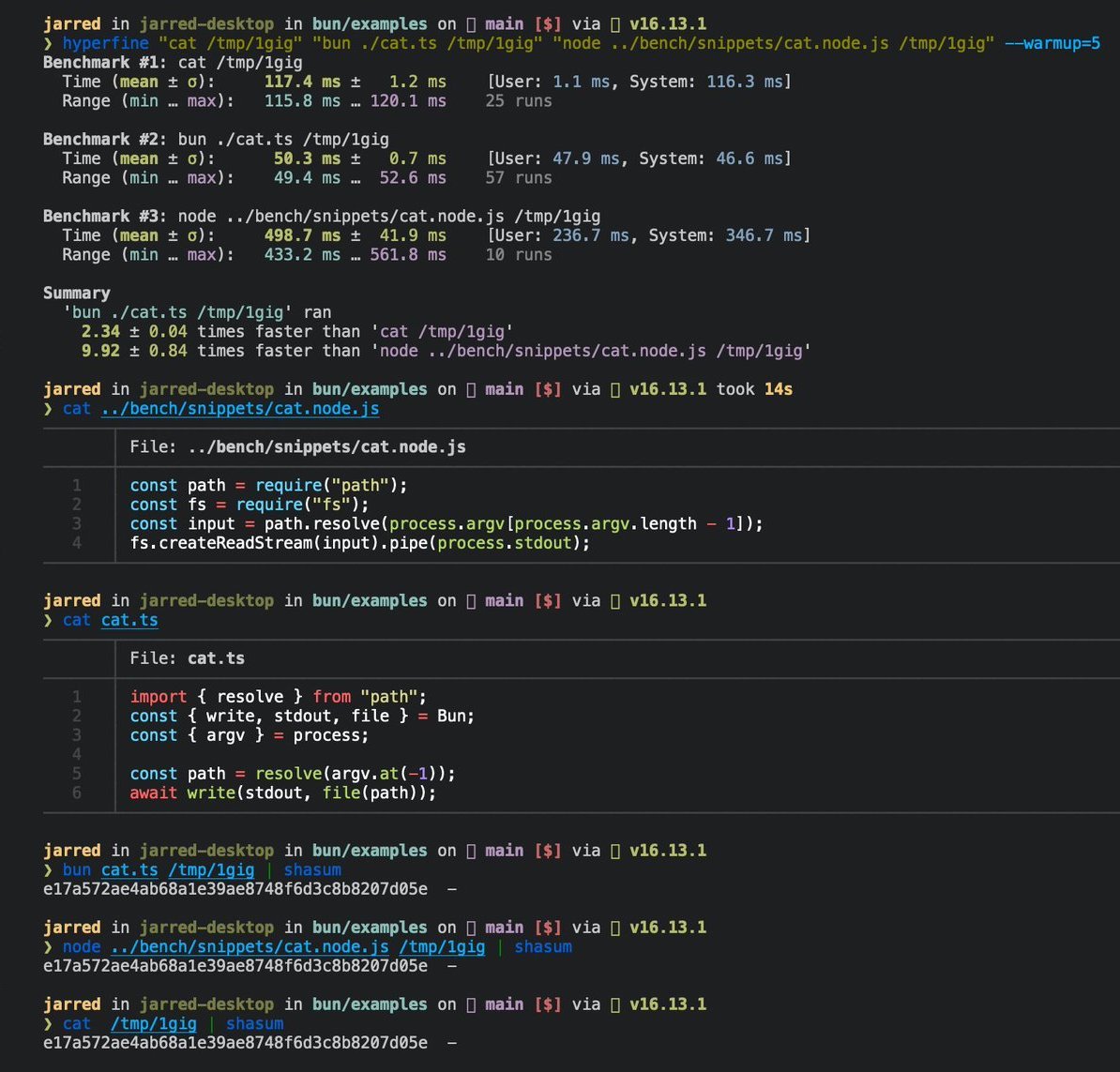
以下是 Linux `cat` 命令的 3 行实现。
```ts cat.ts icon="https://mintcdn.com/span-inc/82N53aP7NFbaCVSl/icons/typescript.svg?fit=max&auto=format&n=82N53aP7NFbaCVSl&q=85&s=787d39d6a7d96d7f9540dc74344eba23" theme={null}
// 用法
// bun ./cat.ts ./path-to-file
import { resolve } from "path";
const path = resolve(process.argv.at(-1));
await Bun.write(Bun.stdout, Bun.file(path));
```
要运行此文件:
```bash terminal icon="terminal" theme={null}
bun ./cat.ts ./path-to-file
```
在 Linux 上,对大文件来说,它的运行速度是 GNU `cat` 的 2 倍。
 ***
## 参考
```ts theme={null}
interface Bun {
stdin: BunFile;
stdout: BunFile;
stderr: BunFile;
file(path: string | number | URL, options?: { type?: string }): BunFile;
write(
destination: string | number | BunFile | URL,
input: string | Blob | ArrayBuffer | SharedArrayBuffer | TypedArray | Response,
): Promise;
}
interface BunFile {
readonly size: number;
readonly type: string;
text(): Promise;
stream(): ReadableStream;
arrayBuffer(): Promise;
json(): Promise;
writer(params: { highWaterMark?: number }): FileSink;
exists(): Promise;
}
export interface FileSink {
write(chunk: string | ArrayBufferView | ArrayBuffer | SharedArrayBuffer): number;
flush(): number | Promise;
end(error?: Error): number | Promise;
start(options?: { highWaterMark?: number }): void;
ref(): void;
unref(): void;
}
```
***
## 参考
```ts theme={null}
interface Bun {
stdin: BunFile;
stdout: BunFile;
stderr: BunFile;
file(path: string | number | URL, options?: { type?: string }): BunFile;
write(
destination: string | number | BunFile | URL,
input: string | Blob | ArrayBuffer | SharedArrayBuffer | TypedArray | Response,
): Promise;
}
interface BunFile {
readonly size: number;
readonly type: string;
text(): Promise;
stream(): ReadableStream;
arrayBuffer(): Promise;
json(): Promise;
writer(params: { highWaterMark?: number }): FileSink;
exists(): Promise;
}
export interface FileSink {
write(chunk: string | ArrayBufferView | ArrayBuffer | SharedArrayBuffer): number;
flush(): number | Promise;
end(error?: Error): number | Promise;
start(options?: { highWaterMark?: number }): void;
ref(): void;
unref(): void;
}
```