> ## Documentation Index
> Fetch the complete documentation index at: https://bun.ll1025.cn/llms.txt
> Use this file to discover all available pages before exploring further.
# JSX
> Bun 中内置的 JSX 和 TSX 支持,具有可配置的转译选项
Bun 支持 `.jsx` 和 `.tsx` 文件。Bun 的内部转译器在执行前将 JSX 语法转换为普通 JavaScript。
```ts react.tsx icon="https://mintcdn.com/span-inc/82N53aP7NFbaCVSl/icons/typescript.svg?fit=max&auto=format&n=82N53aP7NFbaCVSl&q=85&s=787d39d6a7d96d7f9540dc74344eba23" theme={null}
function Component(props: {message: string}) {
return (
{props.message}
);
}
console.log();
```
## 配置
Bun 读取你的 `tsconfig.json` 或 `jsconfig.json` 以确定如何在内部执行 JSX 转换。如果你不想使用这些配置,可以在 [`bunfig.toml`](/runtime/bunfig) 中设置相同的选项。
Bun 遵循以下编译器选项。
### [`jsx`](https://www.typescriptlang.org/tsconfig#jsx)
JSX 结构如何在内部转换为普通 JavaScript。下表列出了 `jsx` 的可能值,以及每个值如何转译这个 JSX 组件:
```tsx theme={null}
Hello
```
| 编译器选项 | 转译输出 |
| --------------------------------------------------- | ---------------------------------------------------------------------------------------------------------------------------------------------------------------------------------------------------------------------------------------------------------------------------------------- |
| `json
{
"jsx": "react"
}
` | `tsx
React.createElement(Box, { width: 5 }, "Hello");
` |
| `json
{
"jsx": "react-jsx"
}
` | `tsx
import { jsx } from "react/jsx-runtime";
jsx("Box", { width: 5 }, "Hello");
` |
| `json
{
"jsx": "react-jsxdev"
}
` | `tsx
import { jsxDEV } from "react/jsx-dev-runtime";
jsxDEV(
"Box",
{ width: 5, children: "Hello" },
undefined,
false,
undefined,
this,
);
`
`jsxDEV` 变量名是 React 的约定。`DEV` 后缀标记用于开发环境的代码。React 的开发版本速度较慢,包含额外的有效性检查和调试工具。 |
| `json
{
"jsx": "preserve"
}
` | `tsx
// JSX 不会被转译
// Bun 目前不支持 "preserve"
Hello
` |
### [`jsxFactory`](https://www.typescriptlang.org/tsconfig#jsxFactory)
仅在 `jsx` 为 `react` 时适用。
用于表示 JSX 结构的函数名。默认值为 `"React.createElement"`。为像 [Preact](https://preactjs.com/) 这样使用不同函数名(`"h"`)的库设置此选项。
| 编译器选项 | 转译输出 |
| --------------------------------------------------------------------- | --------------------------------------------- |
| `json
{
"jsx": "react",
"jsxFactory": "h"
}
` | `tsx
h(Box, { width: 5 }, "Hello");
` |
### [`jsxFragmentFactory`](https://www.typescriptlang.org/tsconfig#jsxFragmentFactory)
仅在 `jsx` 为 `react` 时适用。
用于表示 [JSX 片段](https://react.dev/reference/react/Fragment)(如 `<>Hello`)的函数名。默认值为 `"React.Fragment"`。
| 编译器选项 | 转译输出 |
| ------------------------------------------------------------------------------------------------------------------- | ----------------------------------------------------------------------------------------- |
| `json
{
"jsx": "react",
"jsxFactory": "myjsx",
"jsxFragmentFactory": "MyFragment"
}
` | `tsx
// 输入
<>Hello;
// 输出
myjsx(MyFragment, null, "Hello");
` |
### [`jsxImportSource`](https://www.typescriptlang.org/tsconfig#jsxImportSource)
仅在 `jsx` 为 `react-jsx` 或 `react-jsxdev` 时适用。
组件工厂函数(如 `createElement`、`jsx` 或 `jsxDEV`)导入来源的模块。默认值为 `"react"`。在使用 Preact 等组件库时通常需要设置此选项。
| 编译器选项 | 转译输出 |
| ---------------------------------------------------------------------------------------------------- | --------------------------------------------------------------------------------------------------------------------------------------------------------------------------------------------------------------------------- |
| `jsonc
{
"jsx": "react-jsx",
// jsxImportSource 未定义
// 默认为 "react"
}
` | `tsx
import { jsx } from "react/jsx-runtime";
jsx("Box", { width: 5, children: "Hello" });
` |
| `jsonc
{
"jsx": "react-jsx",
"jsxImportSource": "preact",
}
` | `tsx
import { jsx } from "preact/jsx-runtime";
jsx("Box", { width: 5, children: "Hello" });
` |
| `jsonc
{
"jsx": "react-jsxdev",
"jsxImportSource": "preact",
}
` | `tsx
// /jsx-runtime 会自动追加
import { jsxDEV } from "preact/jsx-dev-runtime";
jsxDEV(
"Box",
{ width: 5, children: "Hello" },
undefined,
false,
undefined,
this,
);
` |
### JSX pragma
你可以通过 *pragma*(一种注释)在每个文件中设置这些值中的任何一个,从而在特定文件中设置编译器选项。
| Pragma | 等效配置 |
| ---------------------------------------- | ------------------------------------------------------------------ |
| `ts
// @jsx h
` | `jsonc
{
"jsxFactory": "h",
}
` |
| `ts
// @jsxFrag MyFragment
` | `jsonc
{
"jsxFragmentFactory": "MyFragment",
}
` |
| `ts
// @jsxImportSource preact
` | `jsonc
{
"jsxImportSource": "preact",
}
` |
## 日志输出
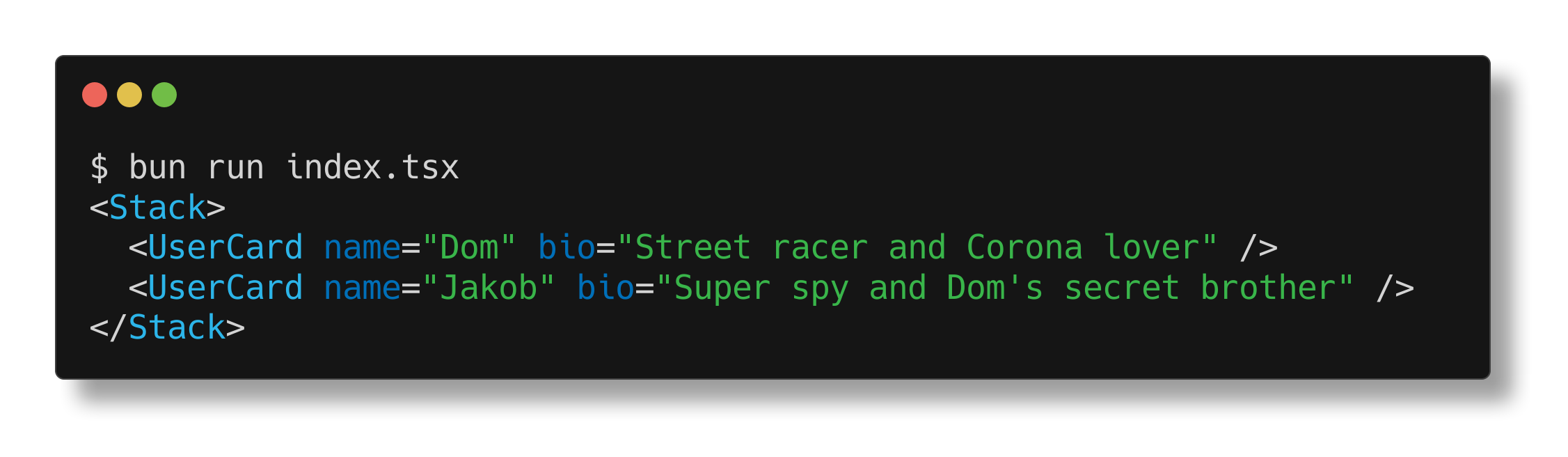
Bun 为 JSX 实现了特殊的日志输出以方便调试。给定以下文件:
```tsx index.tsx icon="https://mintcdn.com/span-inc/82N53aP7NFbaCVSl/icons/typescript.svg?fit=max&auto=format&n=82N53aP7NFbaCVSl&q=85&s=787d39d6a7d96d7f9540dc74344eba23" theme={null}
import { Stack, UserCard } from "./components";
console.log(
,
);
```
Bun 会美化打印组件树:
## Prop 简写
Bun 运行时还支持 JSX 的"prop 简写":一种将变量赋值给同名 prop 的简写方式。
```tsx react.tsx icon="https://mintcdn.com/span-inc/82N53aP7NFbaCVSl/icons/typescript.svg?fit=max&auto=format&n=82N53aP7NFbaCVSl&q=85&s=787d39d6a7d96d7f9540dc74344eba23" theme={null}
function Div(props: {className: string;}) {
const {className} = props;
// 不使用简写
return ;
// 使用简写
return ;
}
```