> ## Documentation Index
> Fetch the complete documentation index at: https://bun.ll1025.cn/llms.txt
> Use this file to discover all available pages before exploring further.
# SQLite
> Bun 原生实现了高性能的 SQLite3 驱动
Bun 原生实现了高性能的 [SQLite3](https://www.sqlite.org/) 驱动。要使用它,从内置的 `bun:sqlite` 模块导入。
```ts db.ts icon="https://mintcdn.com/span-inc/82N53aP7NFbaCVSl/icons/typescript.svg?fit=max&auto=format&n=82N53aP7NFbaCVSl&q=85&s=787d39d6a7d96d7f9540dc74344eba23" theme={null}
import { Database } from "bun:sqlite";
const db = new Database(":memory:");
const query = db.query("select 'Hello world' as message;");
query.get();
```
```txt theme={null}
{ message: "Hello world" }
```
该 API 是同步且快速的。感谢 [better-sqlite3](https://github.com/JoshuaWise/better-sqlite3) 及其贡献者为 `bun:sqlite` 的 API 提供了灵感。
特性包括:
* 事务
* 参数(命名和位置)
* 预编译语句
* 数据类型转换(`BLOB` 变为 `Uint8Array`)
* 无需 ORM 即可将查询结果映射到类 - `query.as(MyClass)`
* 任何 SQLite JavaScript 驱动中最快的性能
* `bigint` 支持
* 单次调用 `database.run(query)` 支持多语句查询(例如 `SELECT 1; SELECT 2;`)
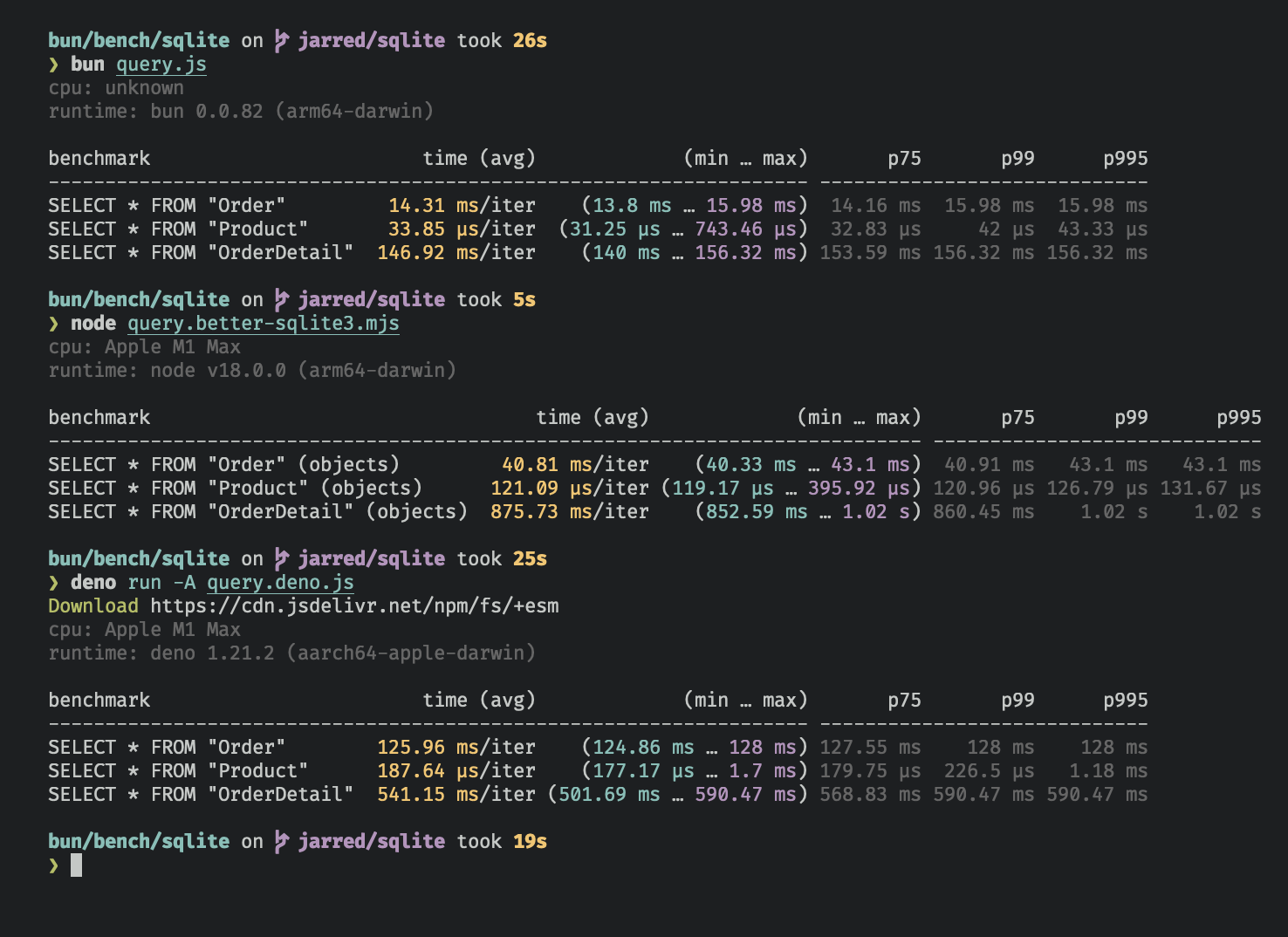
`bun:sqlite` 模块在读取查询方面比 `better-sqlite3` 快大约 3-6 倍,比 `deno.land/x/sqlite` 快 8-9 倍。每个驱动都针对 [Northwind Traders](https://github.com/jpwhite3/northwind-SQLite3/blob/46d5f8a64f396f87cd374160d0bf521523980e8/Northwind_large.sqlite.zip) 数据集进行了基准测试。查看并运行[基准测试源码](https://github.com/oven-sh/bun/tree/main/bench/sqlite)。
***
## 数据库
要打开或创建 SQLite3 数据库:
```ts db.ts icon="https://mintcdn.com/span-inc/82N53aP7NFbaCVSl/icons/typescript.svg?fit=max&auto=format&n=82N53aP7NFbaCVSl&q=85&s=787d39d6a7d96d7f9540dc74344eba23" theme={null}
import { Database } from "bun:sqlite";
const db = new Database("mydb.sqlite");
```
要打开内存数据库:
```ts db.ts icon="https://mintcdn.com/span-inc/82N53aP7NFbaCVSl/icons/typescript.svg?fit=max&auto=format&n=82N53aP7NFbaCVSl&q=85&s=787d39d6a7d96d7f9540dc74344eba23" theme={null}
import { Database } from "bun:sqlite";
// 以下方法都相同
const db = new Database(":memory:");
const db = new Database();
const db = new Database("");
```
要以 `readonly` 模式打开:
```ts db.ts icon="https://mintcdn.com/span-inc/82N53aP7NFbaCVSl/icons/typescript.svg?fit=max&auto=format&n=82N53aP7NFbaCVSl&q=85&s=787d39d6a7d96d7f9540dc74344eba23" highlight={2} theme={null}
import { Database } from "bun:sqlite";
const db = new Database("mydb.sqlite", { readonly: true });
```
如果文件不存在则创建数据库:
```ts db.ts icon="https://mintcdn.com/span-inc/82N53aP7NFbaCVSl/icons/typescript.svg?fit=max&auto=format&n=82N53aP7NFbaCVSl&q=85&s=787d39d6a7d96d7f9540dc74344eba23" highlight={2} theme={null}
import { Database } from "bun:sqlite";
const db = new Database("mydb.sqlite", { create: true });
```
### 严格模式
默认情况下,`bun:sqlite` 要求绑定参数时包含 `$`、`:` 或 `@` 前缀,并且不会在参数缺失时抛出错误。
要在参数缺失时抛出错误并允许不带前缀的绑定,在 `Database` 构造函数上设置 `strict: true`:
```ts db.ts icon="https://mintcdn.com/span-inc/82N53aP7NFbaCVSl/icons/typescript.svg?fit=max&auto=format&n=82N53aP7NFbaCVSl&q=85&s=787d39d6a7d96d7f9540dc74344eba23" highlight={3} theme={null}
import { Database } from "bun:sqlite";
const strict = new Database(":memory:", { strict: true });
// 因为拼写错误而抛出错误:
const query = strict.query("SELECT $message;").all({ messag: "Hello world" });
const notStrict = new Database(":memory:");
// 不会抛出错误:
notStrict.query("SELECT $message;").all({ messag: "Hello world" });
```
### 通过 ES 模块导入加载
你也可以使用导入属性加载数据库。
```ts db.ts icon="https://mintcdn.com/span-inc/82N53aP7NFbaCVSl/icons/typescript.svg?fit=max&auto=format&n=82N53aP7NFbaCVSl&q=85&s=787d39d6a7d96d7f9540dc74344eba23" highlight={1} theme={null}
import db from "./mydb.sqlite" with { type: "sqlite" };
console.log(db.query("select * from users LIMIT 1").get());
```
这等同于以下方式:
```ts db.ts icon="https://mintcdn.com/span-inc/82N53aP7NFbaCVSl/icons/typescript.svg?fit=max&auto=format&n=82N53aP7NFbaCVSl&q=85&s=787d39d6a7d96d7f9540dc74344eba23" theme={null}
import { Database } from "bun:sqlite";
const db = new Database("./mydb.sqlite");
```
### `.close(throwOnError: boolean = false)`
要关闭数据库连接但允许现有查询完成,调用 `.close(false)`:
```ts db.ts icon="https://mintcdn.com/span-inc/82N53aP7NFbaCVSl/icons/typescript.svg?fit=max&auto=format&n=82N53aP7NFbaCVSl&q=85&s=787d39d6a7d96d7f9540dc74344eba23" highlight={3} theme={null}
const db = new Database();
// ... 进行操作
db.close(false);
```
要关闭数据库并在有任何待处理查询时抛出错误,调用 `.close(true)`:
```ts db.ts icon="https://mintcdn.com/span-inc/82N53aP7NFbaCVSl/icons/typescript.svg?fit=max&auto=format&n=82N53aP7NFbaCVSl&q=85&s=787d39d6a7d96d7f9540dc74344eba23" highlight={3} theme={null}
const db = new Database();
// ... 进行操作
db.close(true);
```
`close(false)` 在数据库被垃圾回收时自动调用。多次调用是安全的,但在第一次之后就没有效果了。
### `using` 语句
`using` 语句在块退出时关闭数据库连接。
```ts db.ts icon="https://mintcdn.com/span-inc/82N53aP7NFbaCVSl/icons/typescript.svg?fit=max&auto=format&n=82N53aP7NFbaCVSl&q=85&s=787d39d6a7d96d7f9540dc74344eba23" highlight={4, 5} theme={null}
import { Database } from "bun:sqlite";
{
using db = new Database("mydb.sqlite");
using query = db.query("select 'Hello world' as message;");
console.log(query.get());
}
```
```txt theme={null}
{ message: "Hello world" }
```
### `.serialize()`
`bun:sqlite` 支持 SQLite 内置的[序列化](https://www.sqlite.org/c3ref/serialize.html)和[反序列化](https://www.sqlite.org/c3ref/deserialize.html)数据库到内存的机制。
```ts db.ts icon="https://mintcdn.com/span-inc/82N53aP7NFbaCVSl/icons/typescript.svg?fit=max&auto=format&n=82N53aP7NFbaCVSl&q=85&s=787d39d6a7d96d7f9540dc74344eba23" highlight={2} theme={null}
const olddb = new Database("mydb.sqlite");
const contents = olddb.serialize(); // => Uint8Array
const newdb = Database.deserialize(contents);
```
内部调用 [`sqlite3_serialize`](https://www.sqlite.org/c3ref/serialize.html) 的 `.serialize()`。
### `.query()`
使用 `Database` 实例上的 `db.query()` 方法[准备](https://www.sqlite.org/c3ref/prepare.html) SQL 查询。结果是一个 `Statement` 实例,该实例会被缓存在 `Database` 实例上。*查询不会被执行。*
```ts db.ts icon="https://mintcdn.com/span-inc/82N53aP7NFbaCVSl/icons/typescript.svg?fit=max&auto=format&n=82N53aP7NFbaCVSl&q=85&s=787d39d6a7d96d7f9540dc74344eba23" theme={null}
const query = db.query(`select "Hello world" as message`);
```
**"缓存"意味着什么?**
缓存指的是**编译后的预编译语句**(SQL 字节码),而不是查询结果。当你多次使用相同的 SQL 字符串调用 `db.query()` 时,Bun 会返回相同的缓存 `Statement` 对象,而不是重新编译 SQL。
使用不同的参数值重复使用缓存的语句是安全的:
```ts theme={null}
const query = db.query("SELECT * FROM users WHERE id = ?");
query.get(1); // ✓ 有效
query.get(2); // ✓ 也有效 - 每次都会重新绑定参数
query.get(3); // ✓ 仍然有效
```
当你想要一个不被缓存的新 `Statement` 实例时,请使用 `.prepare()` 而不是 `.query()`,例如当你动态生成 SQL 且不想用一次性查询填满缓存时。
```ts theme={null}
// 编译预编译语句但不缓存
const query = db.prepare("SELECT * FROM foo WHERE bar = ?");
```
***
## WAL 模式
SQLite 支持[预写日志模式](https://www.sqlite.org/wal.html)(WAL),这可以显著提高性能,尤其是在有多个并发读取器和单个写入器时。建议大多数应用程序启用 WAL 模式。
要启用 WAL 模式,在应用程序开头运行此 pragma 查询:
```ts db.ts icon="https://mintcdn.com/span-inc/82N53aP7NFbaCVSl/icons/typescript.svg?fit=max&auto=format&n=82N53aP7NFbaCVSl&q=85&s=787d39d6a7d96d7f9540dc74344eba23" theme={null}
db.run("PRAGMA journal_mode = WAL;");
```
在 WAL 模式下,对数据库的写入直接写入到单独的文件中,称为"WAL 文件"(`-wal`)。还会创建一个共享内存索引文件(`-shm`)用于读取协调。WAL 文件随后会整合到主数据库文件中。可以将其视为待处理写入的缓冲区。有关更详细的概述,请参考 [SQLite 文档](https://www.sqlite.org/wal.html)。
### WAL 附属文件清理
当使用基于文件的数据库的 WAL 模式时,SQLite 会在你的数据库旁边创建两个附属文件:预写日志(`-wal`)和共享内存索引(`-shm`)。这些文件是否在 `.close()` 后自动移除取决于你的平台:
* **macOS**:Bun 使用系统提供的 SQLite,Apple 构建了持久化 WAL。`-wal` 和 `-shm` 文件在关闭后**会持久存在**。这不是 bug——这是 Apple 配置系统 SQLite 的方式。
* **Linux** 和 **Windows**:Bun 静态链接自己的 SQLite 构建,遵循上游默认值。当没有其他连接打开时,附属文件**通常会被移除**。
要确保在所有平台上清理附属文件,在关闭之前禁用 WAL 持久化并运行截断检查点:
```ts db.ts icon="https://mintcdn.com/span-inc/82N53aP7NFbaCVSl/icons/typescript.svg?fit=max&auto=format&n=82N53aP7NFbaCVSl&q=85&s=787d39d6a7d96d7f9540dc74344eba23" theme={null}
import { Database, constants } from "bun:sqlite";
const db = new Database("mydb.sqlite");
db.run("PRAGMA journal_mode = WAL;");
// ... 使用数据库 ...
// 禁用持久化 WAL(macOS 上需要)
db.fileControl(constants.SQLITE_FCNTL_PERSIST_WAL, 0);
// 检查点并截断 WAL 文件
db.run("PRAGMA wal_checkpoint(TRUNCATE);");
db.close();
// 只保留 mydb.sqlite — 没有 -wal 或 -shm 文件
```
***
## 语句
`Statement` 是一个\_预编译查询\_,意味着它已被解析并编译为高效的二进制形式。它可以被执行多次。
使用 `Database` 实例上的 `.query` 方法创建语句。
```ts db.ts icon="https://mintcdn.com/span-inc/82N53aP7NFbaCVSl/icons/typescript.svg?fit=max&auto=format&n=82N53aP7NFbaCVSl&q=85&s=787d39d6a7d96d7f9540dc74344eba23" theme={null}
const query = db.query(`select "Hello world" as message`);
```
查询可以包含参数。它们可以是数字型(`?1`)或命名型(`$param` 或 `:param` 或 `@param`)。
```ts db.ts icon="https://mintcdn.com/span-inc/82N53aP7NFbaCVSl/icons/typescript.svg?fit=max&auto=format&n=82N53aP7NFbaCVSl&q=85&s=787d39d6a7d96d7f9540dc74344eba23" theme={null}
const query = db.query(`SELECT ?1, ?2;`);
const query = db.query(`SELECT $param1, $param2;`);
```
在执行查询时,值会绑定到这些参数。一个 `Statement` 可以通过几种不同的方法执行,每种方法以不同的形式返回结果。
### 绑定值
要向语句绑定值,向 `.all()`、`.get()`、`.run()` 或 `.values()` 方法传递一个对象。
```ts db.ts icon="https://mintcdn.com/span-inc/82N53aP7NFbaCVSl/icons/typescript.svg?fit=max&auto=format&n=82N53aP7NFbaCVSl&q=85&s=787d39d6a7d96d7f9540dc74344eba23" highlight={2} theme={null}
const query = db.query(`select $message;`);
query.all({ $message: "Hello world" });
```
你也可以使用位置参数进行绑定:
```ts db.ts icon="https://mintcdn.com/span-inc/82N53aP7NFbaCVSl/icons/typescript.svg?fit=max&auto=format&n=82N53aP7NFbaCVSl&q=85&s=787d39d6a7d96d7f9540dc74344eba23" theme={null}
const query = db.query(`select ?1;`);
query.all("Hello world");
```
#### `strict: true` 允许不带前缀地绑定值
默认情况下,在向命名参数绑定值时,`$`、`:` 和 `@` 前缀是**包含的**。要在没有这些前缀的情况下绑定,在 `Database` 构造函数中使用 `strict` 选项。
```ts db.ts icon="https://mintcdn.com/span-inc/82N53aP7NFbaCVSl/icons/typescript.svg?fit=max&auto=format&n=82N53aP7NFbaCVSl&q=85&s=787d39d6a7d96d7f9540dc74344eba23" theme={null}
import { Database } from "bun:sqlite";
const db = new Database(":memory:", {
// 不带前缀绑定值
strict: true, // [!code ++]
});
const query = db.query(`select $message;`);
// strict: true
query.all({ message: "Hello world" });
// strict: false
// query.all({ $message: "Hello world" });
```
### `.all()`
使用 `.all()` 运行查询并以对象数组形式获取结果。
```ts db.ts icon="https://mintcdn.com/span-inc/82N53aP7NFbaCVSl/icons/typescript.svg?fit=max&auto=format&n=82N53aP7NFbaCVSl&q=85&s=787d39d6a7d96d7f9540dc74344eba23" highlight={2} theme={null}
const query = db.query(`select $message;`);
query.all({ $message: "Hello world" });
```
```txt theme={null}
[{ $message: "Hello world" }]
```
内部调用 [`sqlite3_reset`](https://www.sqlite.org/capi3ref.html#sqlite3_reset) 并重复调用 [`sqlite3_step`](https://www.sqlite.org/capi3ref.html#sqlite3_step),直到返回 `SQLITE_DONE`。
### `.get()`
使用 `.get()` 运行查询并以对象形式获取第一个结果。
```ts db.ts icon="https://mintcdn.com/span-inc/82N53aP7NFbaCVSl/icons/typescript.svg?fit=max&auto=format&n=82N53aP7NFbaCVSl&q=85&s=787d39d6a7d96d7f9540dc74344eba23" highlight={2} theme={null}
const query = db.query(`select $message;`);
query.get({ $message: "Hello world" });
```
```txt theme={null}
{ $message: "Hello world" }
```
内部调用 [`sqlite3_reset`](https://www.sqlite.org/capi3ref.html#sqlite3_reset) 后跟 [`sqlite3_step`](https://www.sqlite.org/capi3ref.html#sqlite3_step),直到不再返回 `SQLITE_ROW`。如果查询没有返回行,则返回 `null`。
### `.run()`
使用 `.run()` 运行查询并获取包含执行元数据的对象。这适用于模式修改查询(如 `CREATE TABLE`)或批量写入操作。
```ts db.ts icon="https://mintcdn.com/span-inc/82N53aP7NFbaCVSl/icons/typescript.svg?fit=max&auto=format&n=82N53aP7NFbaCVSl&q=85&s=787d39d6a7d96d7f9540dc74344eba23" highlight={2} theme={null}
const query = db.query(`create table foo;`);
query.run();
```
```txt theme={null}
{
lastInsertRowid: 0,
changes: 0,
}
```
内部调用 [`sqlite3_reset`](https://www.sqlite.org/capi3ref.html#sqlite3_reset) 并调用 [`sqlite3_step`](https://www.sqlite.org/capi3ref.html#sqlite3_step) 一次。当你不在乎结果时,不需要遍历所有行。
`lastInsertRowid` 属性是最后插入到数据库中的行的 ID。`changes` 属性是受查询影响的行数。
### `.as(Class)` - 将查询结果映射到类
使用 `.as(Class)` 运行查询并获取作为类实例的结果。该类的 methods、getters 和 setters 在每个行上可用。
```ts db.ts icon="https://mintcdn.com/span-inc/82N53aP7NFbaCVSl/icons/typescript.svg?fit=max&auto=format&n=82N53aP7NFbaCVSl&q=85&s=787d39d6a7d96d7f9540dc74344eba23" highlight={10} theme={null}
class Movie {
title: string;
year: number;
get isMarvel() {
return this.title.includes("Marvel");
}
}
const query = db.query("SELECT title, year FROM movies").as(Movie);
const movies = query.all();
const first = query.get();
console.log(movies[0].isMarvel);
console.log(first.isMarvel);
```
```txt theme={null}
true
true
```
作为性能优化,类的构造函数不会被调用,默认初始化器不会运行,私有字段不可访问。这更像是 `Object.create` 而不是 `new`:类的 prototype 被赋值给对象,因此其 methods、getters 和 setters 可以工作。
数据库列作为属性设置在类实例上。
### `.iterate()` (`@@iterator`)
使用 `.iterate()` 运行查询并增量返回结果。这适用于希望逐行处理结果而不将所有结果加载到内存中的大数据集。
```ts db.ts icon="https://mintcdn.com/span-inc/82N53aP7NFbaCVSl/icons/typescript.svg?fit=max&auto=format&n=82N53aP7NFbaCVSl&q=85&s=787d39d6a7d96d7f9540dc74344eba23" highlight={2} theme={null}
const query = db.query("SELECT * FROM foo");
for (const row of query.iterate()) {
console.log(row);
}
```
你也可以使用 `@@iterator` 协议:
```ts db.ts icon="https://mintcdn.com/span-inc/82N53aP7NFbaCVSl/icons/typescript.svg?fit=max&auto=format&n=82N53aP7NFbaCVSl&q=85&s=787d39d6a7d96d7f9540dc74344eba23" highlight={2} theme={null}
const query = db.query("SELECT * FROM foo");
for (const row of query) {
console.log(row);
}
```
### `.values()`
使用 `values()` 运行查询并获取所有结果作为数组的数组。
```ts db.ts icon="https://mintcdn.com/span-inc/82N53aP7NFbaCVSl/icons/typescript.svg?fit=max&auto=format&n=82N53aP7NFbaCVSl&q=85&s=787d39d6a7d96d7f9540dc74344eba23" highlight={3, 4} theme={null}
const query = db.query(`select $message;`);
query.values({ $message: "Hello world" });
query.values(2);
```
```txt theme={null}
[
[ "Iron Man", 2008 ],
[ "The Avengers", 2012 ],
[ "Ant-Man: Quantumania", 2023 ],
]
```
内部调用 [`sqlite3_reset`](https://www.sqlite.org/capi3ref.html#sqlite3_reset) 并重复调用 [`sqlite3_step`](https://www.sqlite.org/capi3ref.html#sqlite3_step),直到返回 `SQLITE_DONE`。
### `.finalize()`
使用 `.finalize()` 销毁 `Statement` 并释放与其关联的任何资源。一旦终结,`Statement` 就不能再被执行。通常,垃圾回收器会为你做这件事,但在性能敏感的应用程序中,显式终结可能很有用。
```ts db.ts icon="https://mintcdn.com/span-inc/82N53aP7NFbaCVSl/icons/typescript.svg?fit=max&auto=format&n=82N53aP7NFbaCVSl&q=85&s=787d39d6a7d96d7f9540dc74344eba23" highlight={3} theme={null}
const query = db.query("SELECT title, year FROM movies");
const movies = query.all();
query.finalize();
```
### `.toString()`
在 `Statement` 实例上调用 `toString()` 会打印扩展后的 SQL 查询。这有助于调试。
```ts db.ts icon="https://mintcdn.com/span-inc/82N53aP7NFbaCVSl/icons/typescript.svg?fit=max&auto=format&n=82N53aP7NFbaCVSl&q=85&s=787d39d6a7d96d7f9540dc74344eba23" highlight={6, 9, 12} theme={null}
import { Database } from "bun:sqlite";
// 设置
const query = db.query("SELECT $param;");
console.log(query.toString()); // => "SELECT NULL"
query.run(42);
console.log(query.toString()); // => "SELECT 42"
query.run(365);
console.log(query.toString()); // => "SELECT 365"
```
内部调用 [`sqlite3_expanded_sql`](https://www.sqlite.org/capi3ref.html#sqlite3_expanded_sql)。参数使用最近绑定的值进行扩展。
## 参数
查询可以包含参数。它们可以是数字型(`?1`)或命名型(`$param` 或 `:param` 或 `@param`)。在执行查询时将值绑定到这些参数:
```ts title="query.ts" icon="https://mintcdn.com/span-inc/82N53aP7NFbaCVSl/icons/typescript.svg?fit=max&auto=format&n=82N53aP7NFbaCVSl&q=85&s=787d39d6a7d96d7f9540dc74344eba23" theme={null}
const query = db.query("SELECT * FROM foo WHERE bar = $bar");
const results = query.all({
$bar: "bar",
});
```
```txt theme={null}
[{ "bar": "bar" }]
```
编号(位置)参数也可以使用:
```ts db.ts icon="https://mintcdn.com/span-inc/82N53aP7NFbaCVSl/icons/typescript.svg?fit=max&auto=format&n=82N53aP7NFbaCVSl&q=85&s=787d39d6a7d96d7f9540dc74344eba23" theme={null}
const query = db.query("SELECT ?1, ?2");
const results = query.all("hello", "goodbye");
```
```txt theme={null}
[
{
"?1": "hello",
"?2": "goodbye",
},
];
```
***
## 整数
SQLite 支持有符号 64 位整数,但 JavaScript 只支持有符号 52 位整数或使用 `bigint` 的任意精度整数。
`bigint` 输入在所有地方都受支持,但默认情况下 `bun:sqlite` 以 `number` 类型返回整数。如果你需要处理大于 2^53 的整数,在创建 `Database` 实例时将 `safeIntegers` 选项设置为 `true`。这还会验证传递给 `bun:sqlite` 的 `bigint` 值不超过 64 位。
### `safeIntegers: true`
当 `safeIntegers` 为 `true` 时,`bun:sqlite` 以 `bigint` 类型返回整数:
```ts db.ts icon="https://mintcdn.com/span-inc/82N53aP7NFbaCVSl/icons/typescript.svg?fit=max&auto=format&n=82N53aP7NFbaCVSl&q=85&s=787d39d6a7d96d7f9540dc74344eba23" highlight={3} theme={null}
import { Database } from "bun:sqlite";
const db = new Database(":memory:", { safeIntegers: true });
const query = db.query(`SELECT ${BigInt(Number.MAX_SAFE_INTEGER) + 102n} as max_int`);
const result = query.get();
console.log(result.max_int);
```
```txt theme={null}
9007199254741093n
```
当 `safeIntegers` 为 `true` 时,如果绑定参数中的 `bigint` 值超过 64 位,`bun:sqlite` 会抛出错误:
```ts db.ts icon="https://mintcdn.com/span-inc/82N53aP7NFbaCVSl/icons/typescript.svg?fit=max&auto=format&n=82N53aP7NFbaCVSl&q=85&s=787d39d6a7d96d7f9540dc74344eba23" highlight={3} theme={null}
import { Database } from "bun:sqlite";
const db = new Database(":memory:", { safeIntegers: true });
db.run("CREATE TABLE test (id INTEGER PRIMARY KEY, value INTEGER)");
const query = db.query("INSERT INTO test (value) VALUES ($value)");
try {
query.run({ $value: BigInt(Number.MAX_SAFE_INTEGER) ** 2n });
} catch (e) {
console.log(e.message);
}
```
```txt theme={null}
BigInt value '81129638414606663681390495662081' is out of range
```
### `safeIntegers: false`(默认)
当 `safeIntegers` 为 `false` 时,`bun:sqlite` 以 `number` 类型返回整数,并截断超过 53 位的任何位:
```ts db.ts icon="https://mintcdn.com/span-inc/82N53aP7NFbaCVSl/icons/typescript.svg?fit=max&auto=format&n=82N53aP7NFbaCVSl&q=85&s=787d39d6a7d96d7f9540dc74344eba23" highlight={3} theme={null}
import { Database } from "bun:sqlite";
const db = new Database(":memory:", { safeIntegers: false });
const query = db.query(`SELECT ${BigInt(Number.MAX_SAFE_INTEGER) + 102n} as max_int`);
const result = query.get();
console.log(result.max_int);
```
```txt theme={null}
9007199254741092
```
***
## 事务
事务会\_原子性\_地执行多个查询:要么全部成功,要么全都不成功。使用 `db.transaction()` 方法创建事务:
```ts db.ts icon="https://mintcdn.com/span-inc/82N53aP7NFbaCVSl/icons/typescript.svg?fit=max&auto=format&n=82N53aP7NFbaCVSl&q=85&s=787d39d6a7d96d7f9540dc74344eba23" highlight={2} theme={null}
const insertCat = db.prepare("INSERT INTO cats (name) VALUES ($name)");
const insertCats = db.transaction(cats => {
for (const cat of cats) insertCat.run(cat);
});
```
还没有猫被插入。`db.transaction()` 返回一个新函数(`insertCats`),它\_包装\_了执行查询的函数。
要执行事务,调用此函数。参数会传递给包装的函数,并且包装的函数的返回值由事务函数返回。包装的函数还可以访问 `this` 上下文,其定义由事务执行的位置决定。
```ts db.ts icon="https://mintcdn.com/span-inc/82N53aP7NFbaCVSl/icons/typescript.svg?fit=max&auto=format&n=82N53aP7NFbaCVSl&q=85&s=787d39d6a7d96d7f9540dc74344eba23" highlight={3} theme={null}
const insert = db.prepare("INSERT INTO cats (name) VALUES ($name)");
const insertCats = db.transaction(cats => {
for (const cat of cats) insert.run(cat);
return cats.length;
});
const count = insertCats([{ $name: "Keanu" }, { $name: "Salem" }, { $name: "Crookshanks" }]);
console.log(`插入了 ${count} 只猫`);
```
驱动会在调用 `insertCats` 时自动[开始](https://www.sqlite.org/lang_transaction.html)一个事务,并在包装的函数返回时提交。如果抛出异常,事务会回滚。异常会正常传播;不会被捕获。
**嵌套事务** — 事务函数可以从其他事务函数内部调用。此时,内部事务会变成一个[保存点](https://www.sqlite.org/lang_savepoint.html)。
```ts db.ts icon="https://mintcdn.com/span-inc/82N53aP7NFbaCVSl/icons/typescript.svg?fit=max&auto=format&n=82N53aP7NFbaCVSl&q=85&s=787d39d6a7d96d7f9540dc74344eba23" theme={null}
// 设置
import { Database } from "bun:sqlite";
const db = Database.open(":memory:");
db.run("CREATE TABLE expenses (id INTEGER PRIMARY KEY AUTOINCREMENT, note TEXT, dollars INTEGER);");
db.run("CREATE TABLE cats (id INTEGER PRIMARY KEY AUTOINCREMENT, name TEXT UNIQUE, age INTEGER)");
const insertExpense = db.prepare("INSERT INTO expenses (note, dollars) VALUES (?, ?)");
const insert = db.prepare("INSERT INTO cats (name, age) VALUES ($name, $age)");
const insertCats = db.transaction(cats => {
for (const cat of cats) insert.run(cat);
});
const adopt = db.transaction(cats => {
insertExpense.run("adoption fees", 20);
insertCats(cats); // 嵌套事务
});
adopt([
{ $name: "Joey", $age: 2 },
{ $name: "Sally", $age: 4 },
{ $name: "Junior", $age: 1 },
]);
```
事务还提供了 `deferred`、`immediate` 和 `exclusive` 版本。
```ts theme={null}
insertCats(cats); // 使用 "BEGIN"
insertCats.deferred(cats); // 使用 "BEGIN DEFERRED"
insertCats.immediate(cats); // 使用 "BEGIN IMMEDIATE"
insertCats.exclusive(cats); // 使用 "BEGIN EXCLUSIVE"
```
### `.loadExtension()`
要加载 [SQLite 扩展](https://www.sqlite.org/loadext.html),在你的 `Database` 实例上调用 `.loadExtension(name)`:
```ts db.ts icon="https://mintcdn.com/span-inc/82N53aP7NFbaCVSl/icons/typescript.svg?fit=max&auto=format&n=82N53aP7NFbaCVSl&q=85&s=787d39d6a7d96d7f9540dc74344eba23" highlight={4} theme={null}
import { Database } from "bun:sqlite";
const db = new Database();
db.loadExtension("myext");
```
**macOS 用户** 默认情况下,macOS 自带 Apple 专有的 SQLite 构建,不支持扩展。要使用扩展,安装一个原版的 SQLite 构建。
```bash terminal icon="terminal" theme={null}
brew install sqlite
which sqlite # 获取二进制文件路径
```
要将 `bun:sqlite` 指向新构建,在创建任何 `Database` 实例之前调用 `Database.setCustomSQLite(path)`。(在其他操作系统上,这是一个无操作。)传递 SQLite `.dylib` 文件的路径,\_不是\_可执行文件。使用最新版的 Homebrew,路径类似于 `/opt/homebrew/Cellar/sqlite//libsqlite3.dylib`。
```ts db.ts icon="https://mintcdn.com/span-inc/82N53aP7NFbaCVSl/icons/typescript.svg?fit=max&auto=format&n=82N53aP7NFbaCVSl&q=85&s=787d39d6a7d96d7f9540dc74344eba23" highlight={3} theme={null}
import { Database } from "bun:sqlite";
Database.setCustomSQLite("/path/to/libsqlite.dylib");
const db = new Database();
db.loadExtension("myext");
```
### `.fileControl(cmd: number, value: any)`
要使用高级 `sqlite3_file_control` API,在你的 `Database` 实例上调用 `.fileControl(cmd, value)`。参见 [WAL 附属文件清理](#wal-sidecar-file-cleanup) 获取实际示例。
```ts db.ts icon="https://mintcdn.com/span-inc/82N53aP7NFbaCVSl/icons/typescript.svg?fit=max&auto=format&n=82N53aP7NFbaCVSl&q=85&s=787d39d6a7d96d7f9540dc74344eba23" highlight={6} theme={null}
import { Database, constants } from "bun:sqlite";
const db = new Database();
// 确保 WAL 模式不是持久的
// 这可以防止 WAL 文件在数据库关闭后残留
db.fileControl(constants.SQLITE_FCNTL_PERSIST_WAL, 0);
```
`value` 可以是:
* `number`
* `TypedArray`
* `undefined` 或 `null`
***
## 参考
```ts 类型参考 icon="https://mintcdn.com/span-inc/82N53aP7NFbaCVSl/icons/typescript.svg?fit=max&auto=format&n=82N53aP7NFbaCVSl&q=85&s=787d39d6a7d96d7f9540dc74344eba23" expandable theme={null}
class Database {
constructor(
filename: string,
options?:
| number
| {
readonly?: boolean;
create?: boolean;
readwrite?: boolean;
safeIntegers?: boolean;
strict?: boolean;
},
);
query(sql: string): Statement;
prepare(sql: string): Statement;
run(sql: string, params?: SQLQueryBindings): { lastInsertRowid: number; changes: number };
exec = this.run;
transaction(insideTransaction: (...args: any) => void): CallableFunction & {
deferred: (...args: any) => void;
immediate: (...args: any) => void;
exclusive: (...args: any) => void;
};
close(throwOnError?: boolean): void;
}
class Statement {
all(...params: ParamsType[]): ReturnType[];
get(...params: ParamsType[]): ReturnType | null;
run(...params: ParamsType[]): {
lastInsertRowid: number;
changes: number;
};
values(...params: ParamsType[]): unknown[][];
finalize(): void; // 销毁语句并清理资源
toString(): string; // 序列化为 SQL
columnNames: string[]; // 结果集的列名
columnTypes: string[]; // 基于第一行实际值的类型(先调用 .get()/.all())
declaredTypes: (string | null)[]; // CREATE TABLE 模式中的类型(先调用 .get()/.all())
paramsCount: number; // 语句期望的参数数量
native: any; // 表示语句的原生对象
as(Class: new (...args: any[]) => T): Statement;
}
type SQLQueryBindings =
| string
| bigint
| TypedArray
| number
| boolean
| null
| Record;
```
### 数据类型
| JavaScript 类型 | SQLite 类型 |
| ------------- | --------------------- |
| `string` | `TEXT` |
| `number` | `INTEGER` 或 `DECIMAL` |
| `boolean` | `INTEGER` (1 或 0) |
| `Uint8Array` | `BLOB` |
| `Buffer` | `BLOB` |
| `bigint` | `INTEGER` |
| `null` | `NULL` |